

What is dwm.exe? Is It a Virus? Can You Disable It?
You might have come across dwm.exe while going through processes in the Task Manager on your computer and wondered what it is. The dwm.exe is a legitimate Windows process, and it stands for Desktop Window Manager .
Dwm exe process composites the display of all application windows before it comes on your computer screen. In other words, it is a composting manager responsible for rendering the amazing effects that you see on Windows like live taskbar thumbnails, transparent windows, high-resolution monitor support, Flip3D and all the other display effects which you find on Vista and Windows 7.
Why is dwm.exe Running on My Computer?
Now that you have a rough idea about what is dwm.exe , you might be wondering why it is running on my PC. The way Windows applications work is that they do not draw their displays directly to the screen. Instead, all the applications write the pictures of their windows to a particular space in memory.
The Desktop Window Manager enables Windows to then form a composite view of all the application screens before sending tit to the monitor to be viewed by you. While layering the windows for screen display, Windows can add the effects like window animations, transparency etc.
Related: 8 Simple Ways to Fix DWM.exe Errors on Windows 10
Is dwm.exe Safe?
The dwm.exe file on your Task Manager might look suspicious, but in reality, it is as safe a file as can be IF no virus has replicated dwm.exe and placed an executable of its own there. Wait, what?
Nah, don’t worry. The chances of a virus creating a fake executable in the place of dwm.exe are almost nil. However, if you want to be sure that the dwm.exe file you are looking at is the official Windows component and not a virus, you can follow these steps:
- In the Task Manager , locate Desktop Window Manager under the Processes tab and Right Click on it
- From the drop-down menu that opens up, Click on Open file location .
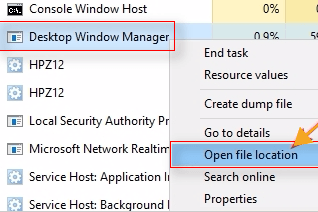
Step 3: Check and be certain that the dwm.exe file is located in the Windows\System32 folder in your computer.
If the dwm.exe file’s location is the Windows\System32 folder, you can be certain that it is indeed an official Windows component and not a virus created an executable file.
As an additional step for your peace of mind, you can always run your preferred virus scanner and be assured of the health of your computer system.
Can You Disable dwm.exe?
To put it in a nutshell, no. That is if you are running anything more recent than Windows Vista or Windows 7 . In Vista, the Desktop Window Manager was controlled via a service which could be turned off if you wanted to disable all the visual effects.
In Windows 7 as well you could find the dwm.exe file under Services. However, since then, it has become a more integral part of Windows and is responsible for creating the visual experience and the graphical user interface.
The good thing is that the Desktop Window Manager has gotten way better over the years at how it manages its resources and you should not need to disable it in order to improve your computer’s performance, especially if you are using Windows 8 or Windows 10.
If you want to maximize your computer system’s performance or feel concerned by the amount of memory space consumed by the dwm.exe file, you can disable Windows Aero and see if that improves the performance of your computer.
In case that does not work for you and you want are running Windows Vista or Windows 7, you can follow these steps below to disable the Desktop Window Manager:
- Hit the Start Button to open the Start Menu
- In the Search box, type services , and press Enter
- Click on the Services link to open the Services window
- Locate Desktop Window Manager in the Services window and Double-Click on it
- Click on Stop in the Desktop Window Manager window to disable it.
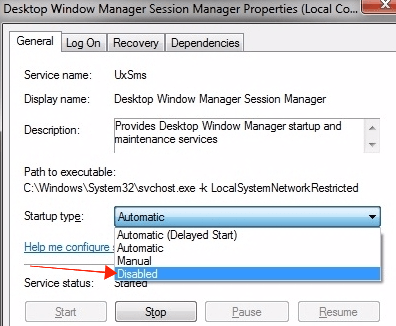
- If you don’t want dwm.exe to start automatically every time Windows loads, locate the Startup type option in the DesktopWindow Manager window and change it from Automatic to Disabled.
Note: These steps can only be performed in Windows 7 and Windows Vista, as dwm.exe does not run through a service in Windows 8 or Windows 10 and hence cannot be located in the Services window for disabling.
Desktop Window Manager Using High CPU and High RAM
The Desktop Window Manager has evolved to use minimal resources while performing its functions. Even with over a dozen applications and tabs opened, it typically consumes around 60 MB RAM and uses less than one percent of CPU capacity.
However, if you find dwm.exe using high RAM or using high CPU, there are a couple of things you can check out.
- Ensure that your hardware drivers are all updated, especially the graphics drivers. Desktop Window Manager offloads a lot of work to GPU to minimize CPU usage
- If the video card or your integrated graphics adaptor is not updated, you can expect to find Desktop Window Manager using high CPU .
- Scan your computer for malware. Some variants of malware are known to cause trouble with how Desktop Window Manager performs
You cannot stop dwm.exe from running if you are using Windows 8 or anything more recent and you should not really require to disable the dwm.exe file even if you are running older versions of Windows like Vista or Windows 7.
You can update hardware drivers , scan your system regularly and maintain it to ensure a smooth Windows experience.
Similar articles
In this post, we’ll guide you on how to fix “You need a WIA driver to use this device” error while using the printer scanner.
HAVE YOU RECENTLY SWITCHED FROM WINDOWS VISTA TO WINDOWS 7 , U must be pretty annoyed by the slow speed of Vista. Believe me Windows 7 is really brilliant operating system that I was waiting for from a long time by Windows team. It is not only fast but the glossy looks, default sounds and themes mak
Either it is a professional purpose or personal purpose the first thing which can help is internet. But other side of the coin is shocking.This problem is something which everybody has encountered with like Viruses, spywares, bad cookies and malware.All together it is well known by the name ‘e-threa
Find a complete guide on what is Akamai Netsession client? Is Akamai Netsession harmful? how to remove Akamai Netsession safely?
The autorun.inf virus corrupts autorun files that are used play/launch programs stored on the removable devices. To remove Autorun&Autorun.inf one needs to use follow certain tips that are mentioned and explain ahead in this article.
It's really annoying when Avast starts blocking websites and internet access, even if the website you want to access is safe. Here are easy fixes you can try to stop Avast from blocking your Internet and websites.