

Android 4.1, Jelly Bean : The world’s most popular platform gets even Better
Android 4.1, Jelly Bean, is the fastest and smoothest version of Android yet. Jelly Bean improves on the simplicity and beauty of Android 4.0 , and introduces a new Google search experience on Android. Android has always put you in control when it comes to staying notified and connected. Now you can take action directly from the notifications shade. Late for a meeting? Email everyone to let them know. Missed a call? Call them back in an instant. And because they’re expandable, you can get an even deeper look into the things that matter most, like multiple emails or photos on Google+.
Widgets work like magic
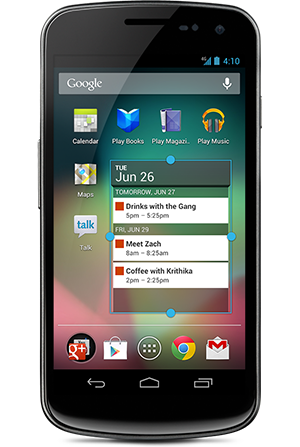
With Jelly Bean it’s now even easier to personalize your home screen. As you place widgets on the screen, everything else automatically moves to make room. When they’re too big, widgets resize on their own. Interacting with your favorite apps and customizing your home screen has never been easier.
Seamlessly take and share photos
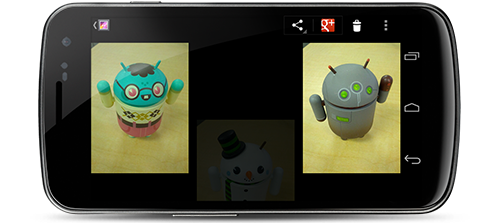
Android 4.0, Ice Cream Sandwich, made snapping photos super fast; Jelly Bean brings that same speed to the next step: viewing. Just swipe over from camera to filmstrip view to instantly view the photos you just took, and quickly swipe away the ones you don’t like. Now sharing — and bragging — are a breeze.
smarter keyboard
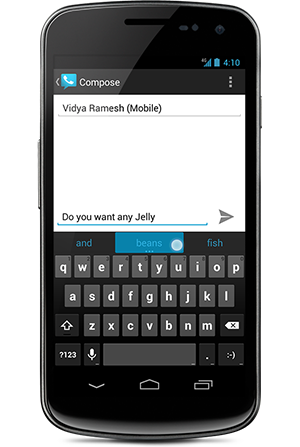
Android’s dictionaries are now more accurate, more relevant. The language model in Jelly Bean adapts over time, and the keyboard even guesses what the next word will be before you’ve started typing it. With improved text-to-speech capabilities, voice typing on Android is even better; it works even when you don’t have a data connection, so you can type with your voice everywhere you go.
Accessibility
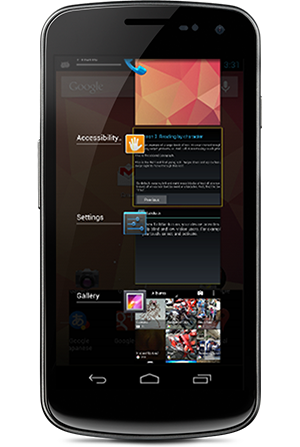
With Jelly Bean, blind users can use ‘Gesture Mode’ to reliably navigate the UI using touch and swipe gestures in combination with speech output. Jelly Bean also adds support for accessibility plugins to enable external Braille input and output devices via USB and Bluetooth.
Android Beam
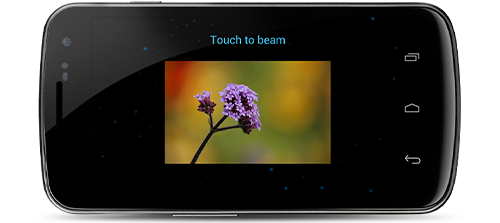
With Android Beam on Jelly Bean you can now easily share your photos and videos with just a simple tap, in addition to sharing contacts, web pages, YouTube videos, directions, and apps. Just touch two NFC-enabled Android devices back-to-back, then tap to beam whatever’s on the screen to your friend. Instantly pair your Android phone or tablet to Bluetooth® devices like headsets or speakers that support the Simple Secure Pairing standard by just tapping them together – no more syncing or searching required.
search experience in Jelly Bean
The best of Google just got better on Android. The search experience in Jelly Bean has a new look-and-feel, and has faster and more natural Voice Search. And Google Now brings you just the right information, before you even ask.
A new look for Search.
Android has search at its core. With Jelly Bean, a redesigned experience uses the power of the Knowledge Graph to show you search results in a richer way. It’s easier to quickly get answers and explore and browse search results.
Voice Search.
Sometimes you’d rather just speak your search query. Or just ask a question. Android lets you search the web with your voice, and it’s convenient for getting quick answers on the fly. It speaks back to you and is powered by the Knowledge Graph, bringing you a precise answer if it knows it, and precisely ranked search results, so you can always find out more.
Similar articles
Spy software for Android should be used by parents to strike a balance in their parenting. This app is very useful and prevents parents from being too nosy or too oblivious of what their teens are doing with their lives. It is important that teens should be informed about the good and bad, since the
Users navigate the app's features by passing their fingers over various options which are read aloud or Lingering on a particular option produces a beep, indicating that the option has been selected are some features for visually impaired people which make their working easier on the pc.
TrustGo AppGenius is the best app discovery tool for Android apps from the global Android markets. It allows you to easily find the best apps in the Market
We searching a lot for best e-Reader Apps for android tablets and after searched we select some best and free also apps for our readers so Today we are sharing some best e-Reader Apps for android tablets and these apps are absolutely free
Engadget Distro brings the best articles from the Engadget site to your tablet in a rich, magazine-like format. Each week a new edition is hand-crafted by the Engadget team featuring the best reviews and features curated from the website along with a weekly editorial to bring you up to speed on any news you might have missed.
If you are eager to know about the weather than a interesting news for you is Google search for tablets gets a weather widget. Now you just type weather in google search on your tablet you'll be greeted by the new weather widget that displays the weather forecast of your current location.