

3 Best Ways To Offer RSS Feed Updates Via SMS To Your Blogreaders
The world is getting smaller day by day. In earlier days computer was a mammoth machine but now it has shrinked to a nice little notebook on your lap. But what lies ahead is “Mobiles”-that everyone carries in pocket. The whole world of information can now be accessed through that tiny device called mobile. So if you have a blog then it is good to provide RSS feed updates to your blog reader via sms .
RSS feeds have traditionally been delivered using a RSS reader / browser or using email. But now, you can also send your RSS feed updates via SMS .
Today I was working on this topic i.e to offer RSS feed updates via sms and so whatever information I gained, I am sharing with you all in this article .
So following is DailyTechPost article on “ 3 Best Ways To Offer RSS Feed Updates Via SMS To Your Blogreaders ”
We would very soon implement SMS subscriptions too using any one of the following.
Google SMS Channel
You can offer RSS feed updates via sms by using Google SMS Channel. All you need is :-
- Google account
- Working RSS feed on your blog
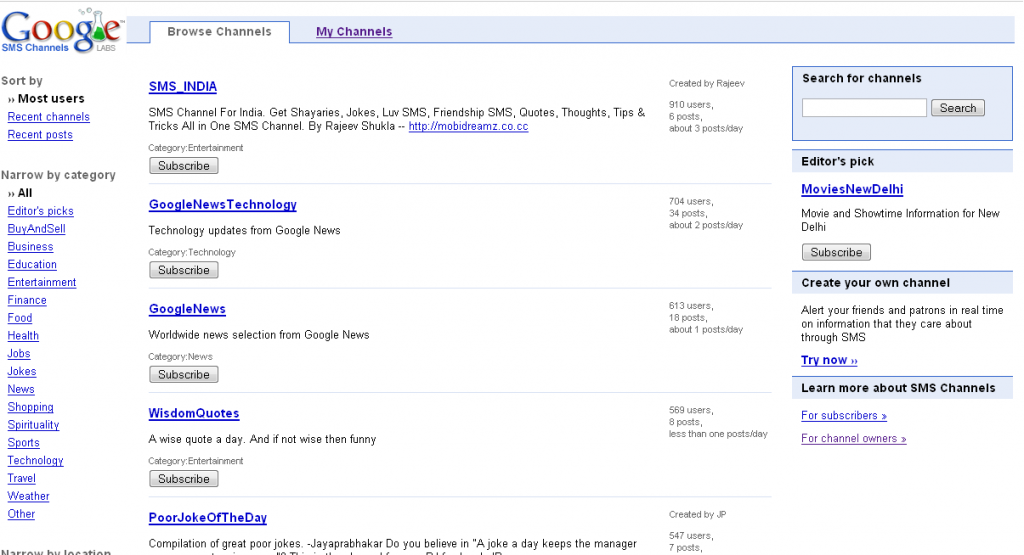
Just login to Google using your Google account and go to: http://labs.google.co.in/smschannels/browse
You will need to enter your mobile number there, and then it will be verified by Google by sending you a verification code via sms.
After verification, click on My Channels
Create your own channel by clicking on “ Create “. Enter the Channel Name, Description etc and in the source, select RSS/ Atom Feed and enter your Blog’s RSS feed URL.Tick the ‘Allow Publishing by – only ME’ and ‘Who can subscribe – Any user’ options. You can set the content to the Title or the Title with Body.
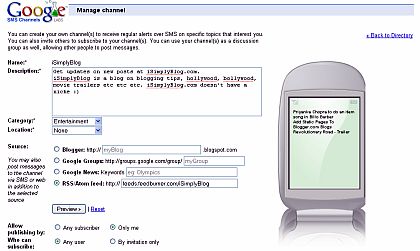
Click Create Channel and start inviting users to your Blog’s SMS channel. Users can now get SMS updates for your blog by SMSing ON < channelname > to 9870807070 .
However its free to use but it can only be used in India.
My Today
Its another free service to offer RSS feed updates via SMS. All you need to do is to register yourself and start using it right away.
To Register
- Send sms REG to 098452 98452 . Only for Indian mobile users.
- They will send back you the password.
Login to your My Today account by using mobile no. and password.
To add RSS Feed Go to My World >> feeds >> manage feeds option. [ link ]
Select SMS from the list of folders you see. [ link ]
Now enter Name, feed URL and check Send SMS option and click create.
Tatango
Tatango also provides a service to offer RSS feed updates via SMS. To know more have a look at CEO Derek Johnson’s video on this link .
If you know some other sites that offer RSS Feed Updates Via SMS then do share it with us. We would be glad to hear it from you.
Similar articles
Domain Name is a very crucial part of any website or blog. Good domain name can also help you in improving your search rankings apart from making a brand out of the blog/website. So undoubtedly deciding domain name becomes the most important factor. But for a newbie it becomes a cumbersome task to d
Today WordPress is the most used platform, particularly for blogging. If you are a blogger and use WordPress as your platform, then you must ensure that you have taken up some measures to backup your data. The measures can be anything including manually backing up from PHP My Admin or using any plug
I believe that we all bloggers will agree to the fact that blogging is all about sharing. Success cannot come to those who prefer to be alone
WordPress photo gallery plugins allow you to easily extend the functionality of your WordPress blog to feature images and enrich your WP blog posts. Thankfully there are several WordPress photo gallery plugins and simple WordPress picture plugins to serve this need. Here is a list of 7 Best Free Pho
You know what I am in love with wordpress just as everybody else is in the blogger community. And with its wide range of plugins, almost anything is possible with wordpress platform. There are numerous wordpress plugins available covering all range of functionality that one can even think of.
jQuery is one of the most popular Javascript framwork out there. It is very easy to use and full of cool features. But it can be quite tedious for any web developer to know how to use the code and create amazing stuff using jQuery . So, develepors decided to release and create plugins to help us ful